Open your CRM and look at the newest leads. Most have a name, an email, and maybe a job title. Very few have enough information to help you decide what to do next. That gap is what lead enrichment is meant to close.
That gap keeps reopening because B2B contact data goes stale. People change jobs, move into new roles, and companies change over time. That’s why enrichment has become a standard part of the outreach process. Most explanations stop at “it adds more data to a lead.” The more useful question is whether that data helps you make a better decision.
Table of contents
- What Is Lead Enrichment?
- Lead Enrichment vs. Everything It Gets Confused With
- What Gets Enriched (and Why Most of It Doesn’t Matter)
- How Lead Enrichment Works
- Where Enrichment Fits in the Real B2B Outreach Workflow
- What Enrichment Does for Personalization (and What It Doesn’t)
- When Not to Enrich (or Contact) a Lead
- A Short Word on Privacy and Enrichment Data
- Closing: Enrich for the Decision
- FAQ
What Is Lead Enrichment?
Lead enrichment is the process of adding, updating, validating, or contextualizing information about a lead your business already knows about. The goal is to give sales and marketing teams enough useful information to make better decisions.
What matters is whether that information changes what you do next. It might affect who gets contacted, who owns the account, or what the message says. In some cases, it may show that the lead isn’t worth contacting at all.
To understand where lead enrichment fits, it helps to separate it from a few related processes first. Then we can look at what data is worth adding, how enrichment works in practice, and where problems can arise.
Lead Enrichment vs. Everything It Gets Confused With
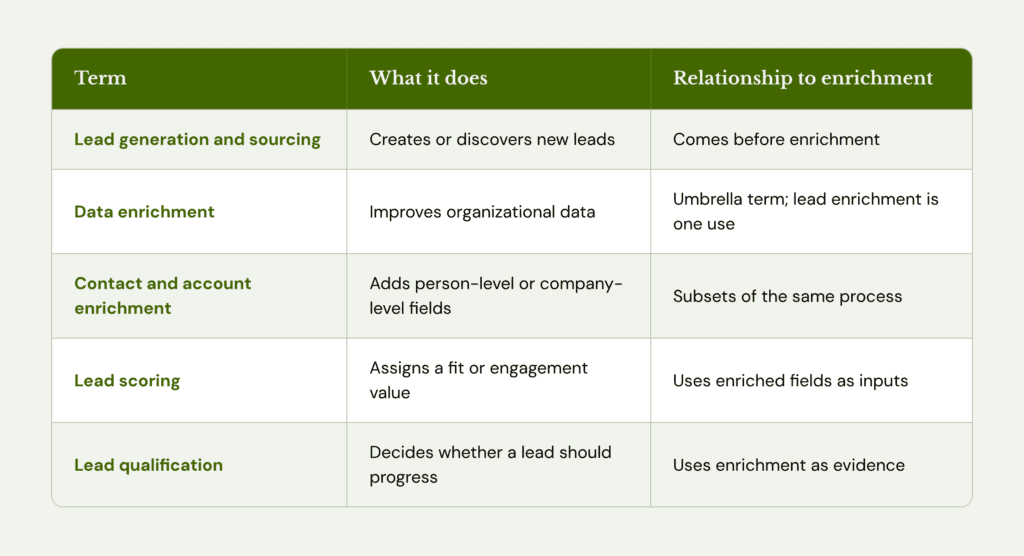
Lead enrichment often gets grouped with lead generation, scoring, and qualification. Each one serves a different purpose:
- Lead Enrichment vs. Lead Generation and Sourcing
Lead generation and sourcing create or discover new leads. Enrichment adds useful information to a lead that already exists. Generation comes first in the funnel, and enrichment comes after. If you’re still working out where leads come from, a B2B lead generation strategy is the place to start.
- Lead Enrichment vs. Data, Contact, and Account Enrichment
These terms nest inside each other. Data enrichment is the umbrella for any organizational data: contacts, companies, customers, accounts. Lead enrichment is one use of it.
Contact enrichment focuses on person-level details such as job title, email, and location. Account enrichment covers company-level details such as industry, headcount, and tech stack. Vendors use all of them loosely, so expect the terms to blur.
- Lead Enrichment vs. Lead Scoring
Enriched fields often feed into lead scoring, but the two serve different purposes. Lead scoring assigns a fit or engagement value to a lead. Enrichment provides the information used to calculate that value. A score built on limited data can only tell you so much.
- Lead Enrichment vs. Lead Qualification
This distinction matters because the two happen at different points in the decision process. Enrichment tells you more about a lead. Qualification helps you decide what to do with that information.
A beautifully enriched bad-fit prospect is still a bad-fit prospect.
Teams miss this because a filling record feels like progress. Employee count, funding stage, and tech stack all show up, and nothing has been decided yet. But, someone still has to decide whether the lead matches the ideal customer profile (ICP), has a plausible need, and deserves a rep’s time. Enrichment gives that person better evidence. It doesn’t make the call.
What Gets Enriched (and Why Most of It Doesn’t Matter)
Enrichment data falls into a few categories. Each one is worth adding only if it can help your team make a better decision.
- Contact and professional (job title, seniority, department, email): helps identify who to contact and which persona they fit.
- Firmographic (industry, headcount, revenue range, location): helps assess ICP fit, segmentation, and territory.
- Technographic (CRM, analytics, marketing tools): can inform integration, compatibility, or migration messaging.
- First-party behavior (page visits, downloads, product activity): can provide context around interest, priority, and timing.
- External signals (hiring activity, funding, company changes, topic interest): can add context around timing and account priority. For a deeper look at intent, see how to use user intent data in a B2B SaaS strategy.
- Account (parent company, subsidiaries, ownership): helps determine how an account is structured, treated, and routed.
- Operational (customer status, open opportunity, owner, duplicate, suppression): helps determine whether outreach should happen at all.
The value of these fields becomes clearer when you sort them by what they actually help you do. Actionable fields can affect eligibility, priority, ownership, timing, channel, message, or offer. Contextual fields can make research easier without directly changing an outreach decision. Decorative fields add information to the record without giving the team much to act on.
A useful test is to ask: What decision changes if this field contains value X rather than value Y? If the answer is “none,” the field is probably a nice-to-have. Its value also depends on the campaign. Technographic data can be important if you’re selling a migration product. It matters much less when your offer has little to do with the prospect’s existing tech stack.
How Lead Enrichment Works
The data comes from a mix of commercial datasets, third-party providers, public web information, and your own CRM and behavioral history. HubSpot’s documentation shows what this looks like in practice. It compares identifiers such as name, work email, and company domain against its commercial dataset, third-party providers, and public sources. When it finds matching information, it can update the record. This gives a clearer picture of how enrichment works behind the scenes.
How you run it matters as much as where it comes from:
- Manual research suits small lists and strategic accounts. The risk is labor and inconsistency.
- Real time or API enrichment suits inbound leads and new CRM records.Incorrect matches can spread immediately.
- Scheduled enrichment suits periodic refreshes. You can pay repeatedly for fields nobody uses.
- Bulk or CSV enrichment suits event lists and old databases. Mismatches multiply at scale.
- Continuous enrichment suits fast-moving fields like job changes. Without rules, it can overwrite better first-party data.
That last risk is real. Apollo, for example, lets you set field mappings and choose whether enriched values overwrite what’s already in your CRM. Most lead enrichment tools have some version of that setting, and someone should own it.
Then there’s waterfall enrichment, which increases data coverage by checking several providers in sequence until one returns the requested field. More sources increase the chance of finding a value, but not necessarily an accurate one. Apollo, for example, treats email and phone validation as a separate, optional layer. Independent research comparing single-provider and waterfall setups is limited, so claims about improved accuracy should be treated carefully.
Where Enrichment Fits in the Real B2B Outreach Workflow
Enrichment is one link in a longer chain inside your lead generation pipeline:
Raw lead → identity resolution → enrichment → validation → qualification → segmentation and prioritization → routing → message and offer decision → outreach → measurement → CRM refresh
Consider two leads with the same title: “VP Marketing.” One works at a 25-person SaaS startup that recently raised funding. The other works at a 5,000-person enterprise that already uses a competing stack.
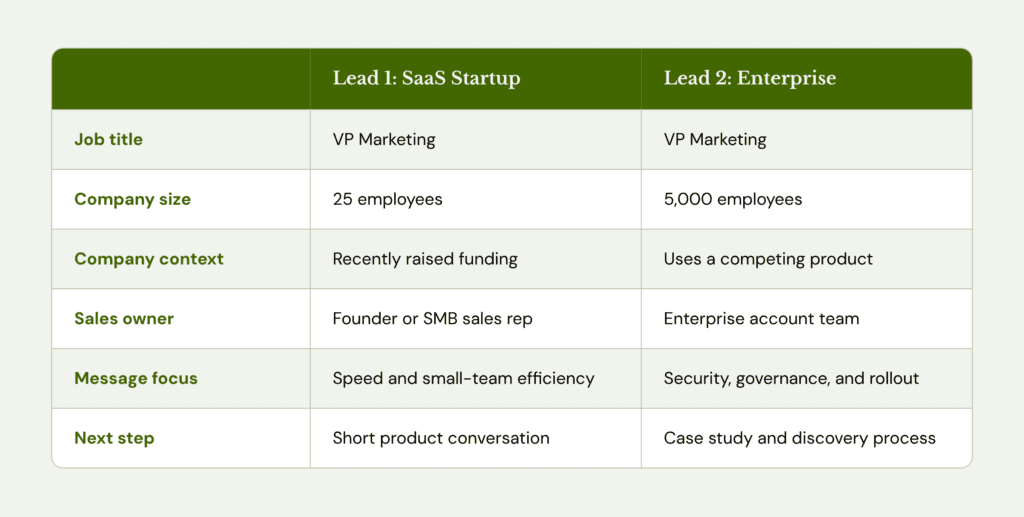
That context also affects ownership and routing.If your team runs account-based marketing, the enriched account record is what decides who works the account and how. It can also provide context for the conversation. Good sales enablement content starts from what the record says about the buyer.
One practitioner, Fivos Aresti, described his outbound workflow on LinkedIn. He qualifies accounts by industry, location, funding, and CRM. Then he enriches, picks contacts, tiers them, and runs multichannel outreach. His argument is that segmentation matters more than indiscriminate AI personalization. While it’s one practitioner’s approach, it reinforces a useful point: relevance is decided before the email is written.
In this example, none of those fields simply served as a merge tag. They informed me of a decision. If a field can’t change one of those choices, it probably doesn’t need to be in the record.
Enriched Doesn’t Mean Verified
A populated field isn’t a confirmed one. Before using enriched contacts in an outreach campaign, you can run their email addresses through a free email validator to check whether they’re valid. Enrichment finds a value. Validation is a separate step that confirms it’s usable. Apollo makes the split visible by offering validation as a separate layer alongside provider data. An email address in the field can still bounce.
Contact data also becomes outdated. The U.S. Bureau of Labor Statistics reported that 22.2% of wage and salary workers had been with their current employer for a year or less as of January 2024. Median tenure was 3.9 years, and 2.7 years for workers aged 25 to 34. That’s labor market data, not a measure of B2B database decay. But it explains why title and employer fields go out of date.
The widely cited claim that B2B data decays 30% a year is poorly sourced. Lusha’s 2026 analysis challenges that figure and reports a measured rate of 12.6% in its own contact dataset. However, decay rates vary by field and database.
In a survey by Validity, 76% of 602 CRM users said less than half of their CRM data was accurate and complete. These findings reflect users’ perceptions rather than independently verified data accuracy.
The practical takeaway is that verification effort should scale with the cost of being wrong. A slightly inaccurate employee count is low stakes. A wrong email address can bounce. An outdated employer can undermine the opening line. An incorrect existing-customer flag or opt-out status can create a more serious risk.
What Enrichment Does for Personalization (and What It Doesn’t)
Personalization comes in three levels:
- Merge field: “Hi Maya, saw you work at Acme.”
- Segment relevance: “Teams at 20 to 50 person SaaS companies often hit this problem around now.”
- Signal based relevance: a real, verified trigger, such as a role change, a new hire, or a technology adoption.
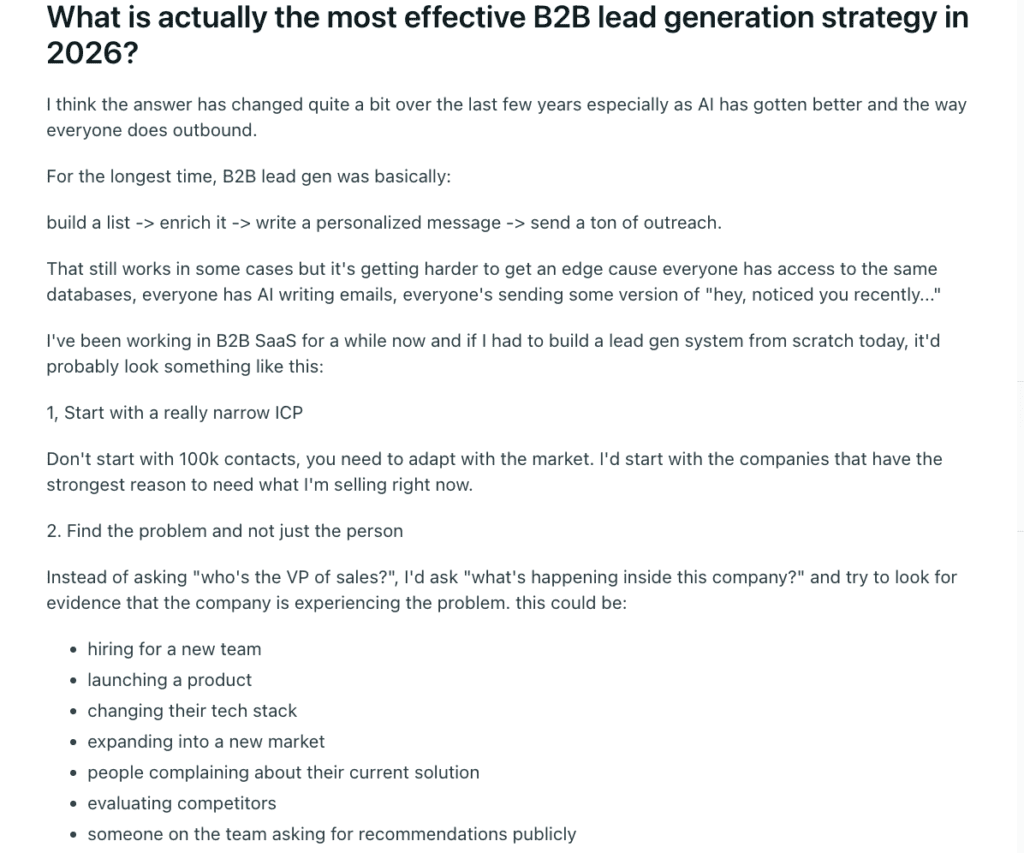
A B2B SaaS practitioner on Reddit described this as looking for the problem. Alongside role and company data, they look for signals such as hiring activity, product launches, tech-stack changes, and market expansion. Those details can give the outreach team useful context for why a conversation might be relevant now.
The strongest causal evidence that personalization moves behavior comes from field experiments published in Marketing Science by Sahni, Wheeler, and Chintagunta, run by Stanford researchers. Adding the recipient’s name to a subject line lifted open probability from 9.05% to 10.80% and lead rate from 0.39% to 0.51%. But it’s older, broader research, not a modern B2B cold outbound benchmark. It shows personalization can matter. It doesn’t show that more enrichment lifts reply rates by any given amount.
You’ll also see claims that personalization doubles replies. Many trace back to agencies citing each other rather than a primary dataset. Skip those numbers.
Outbound practitioners keep making a distinction here, and it’s opinion, not data. Personalization and relevance aren’t the same. A message can mention your name and role and still give you no reason to act now. Enrichment pays off when it changes why the email matters to the reader. Adding more variables to a template doesn’t do that.
When Not to Enrich (or Contact) a Lead
A useful way to keep enrichment small is a minimum viable record with five checks:
- Identity: Is this the right person and company?
- Reachability: Do we have a validated channel?
- Fit: Does it meet our ICP criteria?
- Context: Which one or two signals could change the message or timing?
- Status: Is this an existing customer, open opportunity, duplicate, suppressed record, or someone who has opted out?
That last check often matters most. Sometimes the most valuable enrichment field is an exclusion field. Customer status, duplicate status, poor fit geography, or opt-out status can save more effort than another personalization variable.
Four mistakes come up repeatedly:
- Enriching before defining the ICP, which just makes irrelevant records more complete.
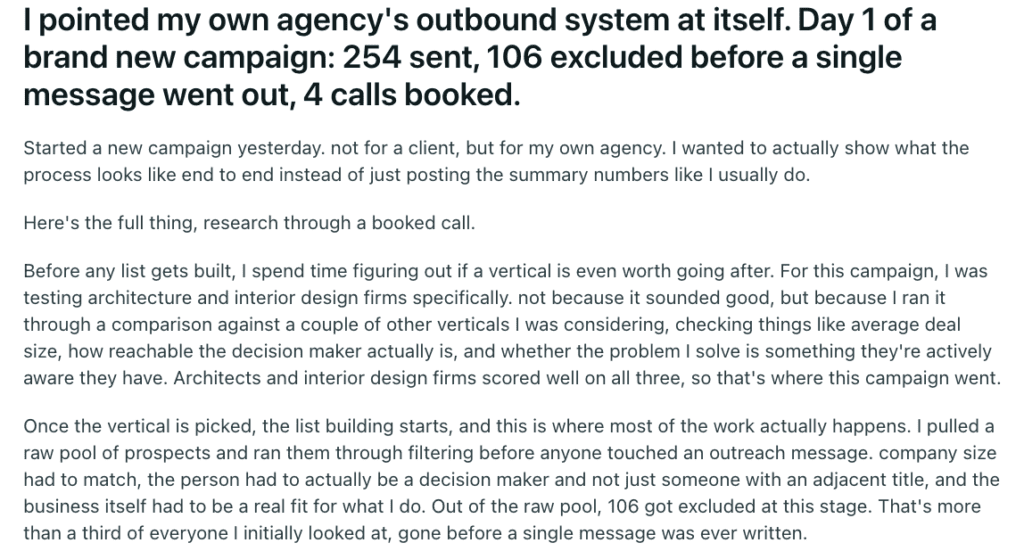
A recent Reddit discussion gives a good example of this in practice. An agency owner said they filtered prospects by company size, decision-making role, and business fit before doing any deeper enrichment. Prospects that passed the initial filter got more research around recent projects, website changes, and other useful context. If there wasn’t enough reason to reach out, they were left out of the campaign.
This order can save a lot of wasted work: filter first, then enrich the leads worth pursuing. You avoid spending time and enrichment credits researching prospects who don’t fit the campaign anyway.
- Overwriting first party CRM data with third party fields without rules.
- Assuming more waterfall providers means higher accuracy.
- Treating an AI inferred field as a verified fact. Keep observed, provider verified, and AI inferred data labeled differently.
A Short Word on Privacy and Enrichment Data
Business contact data can still be personal data. A name, work email, or job title can relate to an identifiable person, so “it’s just B2B” isn’t a safe assumption.
The GDPR data minimization principle in Article 5 says personal data must be limited to what’s necessary for its stated purpose. That’s the article’s own point with legal backing: don’t collect fields that don’t change a decision.
Legitimate interest can support some B2B marketing, but it isn’t a blanket pass. Under ICO guidance, the individual’s right to object to direct marketing remains decisive.
This is general marketing and operational context, not legal advice. Have qualified counsel review your outreach program for the jurisdictions you contact.
Closing: Enrich for the Decision
Nobody needs a CRM that’s 100% complete. You need records accurate enough to act on for the decision in front of you. That might be a first email, a handoff to an account exec, or a decision to leave someone alone.
Before you add another field or provider, ask what decision it’s supposed to change. If you can’t answer, it’s a cost and a governance risk before it’s ever a benefit.
Bring your current process and the team can look at which fields are actually changing your outreach.
FAQ
What is the meaning of lead enrichment?
Lead enrichment is the process of adding, updating, validating, or contextualizing information on a lead you already know about, so sales and marketing can make better decisions with it.
What’s the difference between lead enrichment and lead generation?
Lead generation creates or discovers a lead. Lead enrichment improves a record that already exists. See the comparison table above.
What is waterfall enrichment?
It sends a request through several data providers in sequence until one returns the field you need. It improves coverage, but accuracy still depends on matching and validation.