
Picking a website platform isn’t just about what looks good or what your friend recommends. Your choice determines whether Google can find your content, how fast your pages load, and ultimately, whether you rank at all. I’ve watched too many businesses make the wrong decision and waste months trying to fix ranking issues that never should have existed. They spend thousands on SEO services when the real problem is the platform fighting them every step of the way.
This guide highlights 10 platforms that actually work for SEO in 2026. Some focus on blogs, others specialize in ecommerce, and a few handle complex enterprise needs. The key is matching your specific situation with what each platform does best, so let’s
What actually matters for SEO
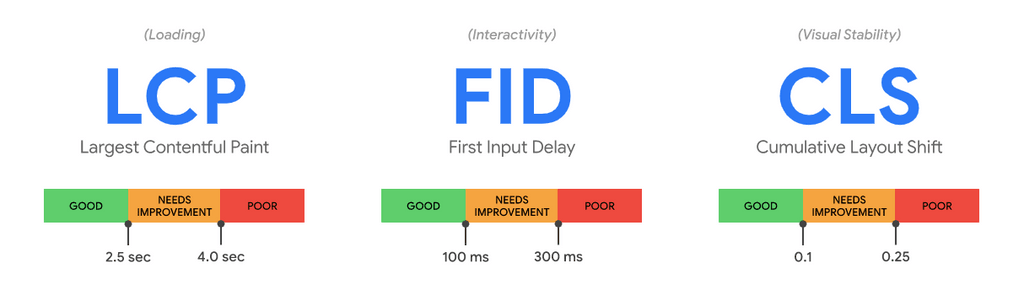
Google’s Core Web Vitals have made it clear: Speed is non-negotiable. Since slow sites simply don’t rank, platforms must generate clean code that loads fast. Bloated frameworks kill your chances before you even start.
Mobile optimization is just as critical. Google looks at mobile sites first when determining rankings, and if you aren’t handling responsiveness automatically, you’re already behind.
Structured data acts as your translator. This backend code labels your content so Google can easily display star ratings, pricing, and availability in search results. Platforms that make this easy without requiring a developer give you a massive advantage over sites still manually wrestling with code.
Clean URLs also matter—more than people realize. Both search engines and actual humans prefer URLs that clearly describe the content. If a platform forces weird parameters or prevents customization, it creates unnecessary headaches for your SEO and lowers your click-through rates.
Another factor people overlook is crawl efficiency. Google doesn’t have infinite time to spend on your site. If a platform generates excessive duplicate pages or messy archives, it wastes your crawl budget on junk. This effectively buries your most important content, as Googlebot may never reach your newest products or latest posts.
Security also plays a quiet but real role. Hacked sites lose trust instantly, and Google’s filters will demote a compromised site almost immediately. Choosing a platform that simplifies updates and backups protects your rankings long term, even if you never think about it day to day.
Top 10 SEO platforms for 2026
Your choice of platform dictates how much manual work you’ll do versus how much the system handles for you. Since every CMS has a different “SEO personality,” the following reviews can help you pick the one that matches your technical skill level and your business goals.
1. WordPress
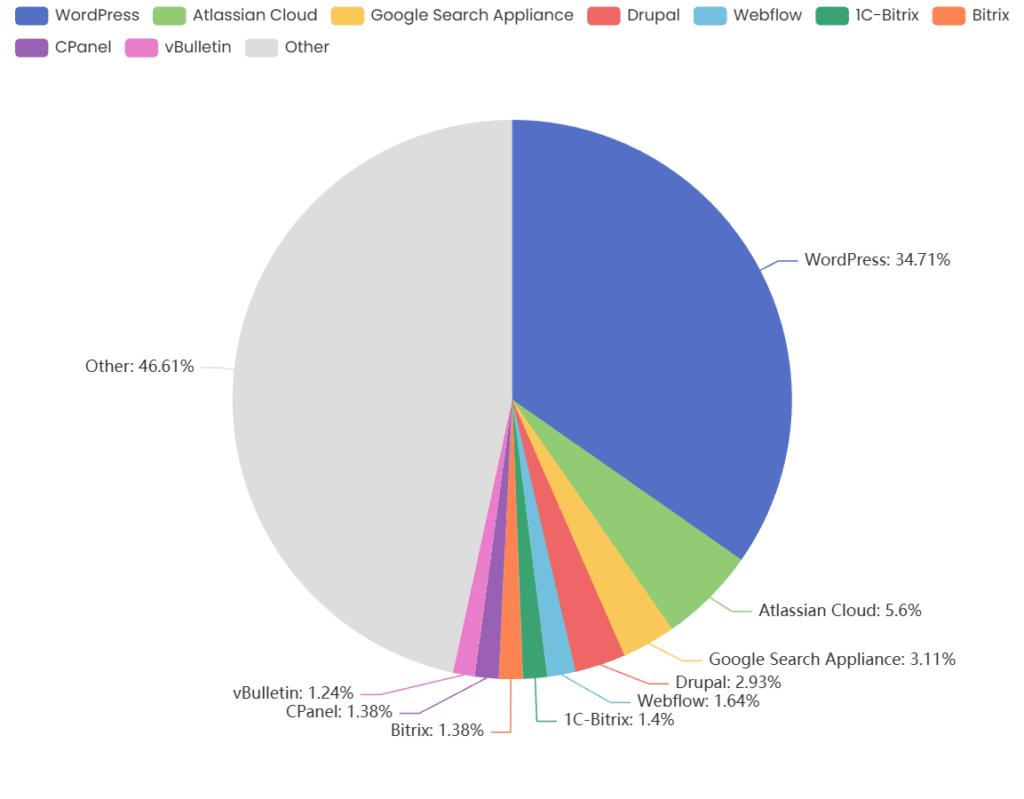
WordPress runs about 40% of the web for good reason—it gives you complete control over every SEO element. Want to tweak your meta tags? Done. Need custom schema markup? Easy with plugins. This flexibility is unmatched compared to what you get with closed platforms.
The plugin ecosystem solves basically every SEO problem you’ll face. Tools like Yoast, Rank Math, and All in One SEO offer features that would cost thousands in custom development elsewhere. You can start simple with the basics and add advanced capabilities as your needs grow.
But here’s the catch: WordPress performance depends entirely on your hosting, and cheap shared hosting will kill your site speed and tank your rankings. Choosing the best hosting for WordPress means getting optimized servers, automatic updates, and security that keeps your rankings safe. The hosting-WordPress relationship determines your Core Web Vitals scores, which directly affect whether you rank for competitive terms.
Content management also works smoothly once you master the block editor. The system handles proper heading structures and semantic HTML automatically. You can schedule posts weeks in advance, organize content with categories and tags (which helps Google understand your site structure), and manage multiple contributors without worrying about security. The revision history alone makes it a lifesaver for anyone who’s ever accidentally deleted something important.
2. Wix
Wix used to be absolutely terrible for SEO. Seriously, SEO professionals wouldn’t touch it. But after pouring massive resources into infrastructure improvements, the platform fixed most of the problems that plagued early versions. Modern Wix sites now load fast enough to compete in search results.
The SEO Setup Checklist (formerly SEO Wiz) walks you through optimization one step at a time, which is incredibly helpful if you’re not technical and don’t want to hire someone. It handles essentials like meta descriptions, mobile optimization, and basic structured data automatically so you don’t have to worry about understanding code.
The big downside is you may hit walls with advanced stuff. While Wix handles basics fine, it struggles with complex schema, which makes it great for local businesses with simple needs but not so great for content-heavy sites fighting for competitive keywords.
3. Shopify
For online stores, Shopify absolutely dominates. Product schema happens without plugins or configuration, meaning your items show up in search results with pricing, customer ratings, and availability status—earning you way more clicks than boring plain text listings ever could.
Speed optimization is also built in from day one. CDN, image compression that doesn’t destroy quality, and lazy loading ensure everything loads fast without manual tweaking or hiring developers. If you need more power, the app store extends your functionality with SEO audits, advanced schema implementations, and tools tracking your rankings automatically.
While URL structure can get messy with complex category setups (which is annoying if you have a big catalog), Shopify is still the top choice for product-focused businesses.
4. Squarespace
Squarespace looks beautiful right out of the box and handles SEO basics surprisingly well. Every template handles mobile optimization automatically, and the code stays clean compared to many other drag-and-drop builders. The platform also includes SSL certificates and automatic sitemaps in every plan.
Squarespace is ideal for creative professionals, photographers, and small businesses wanting an attractive site without sacrificing search visibility. The blogging tools work well for content marketing, and even though you won’t get advanced customization options, most people don’t need them anyway.
5. Webflow
Webflow bridges the gap between visual design tools and actual code control. You get complete control over output without having to write everything from scratch. Clean HTML, CSS, and JavaScript load efficiently, and custom animations won’t slow anything down.
While Webflow definitely has a steeper learning curve than simple drag-and-drop builders, the payoff is worth it. Once you master the interface, you can implement advanced schema, custom tracking setups, and sophisticated optimizations that aren’t possible elsewhere. This makes it great for agencies and designers who need both creative freedom and serious SEO performance.
6. Ghost
Ghost focuses purely on publishing—delivering lightweight, fast pages that load almost instantly. The platform includes essential SEO features like automatic sitemaps and structured data, and its markdown editor keeps you focused on writing instead of fighting with formatting.
Ghost is ideal for content creators prioritizing speed and simplicity. You won’t get complex features, but you won’t need them if publishing quality content consistently is your main goal.
7. Drupal
By managing complex permissions, multiple content types, and sophisticated workflows that would break simpler platforms, Drupal handles enterprise needs with ease. Yes, performance optimization requires technical knowledge, but the platform delivers serious scalability for high-traffic sites.
While Drupal is definitely overkill for small sites, its SEO modules have no problem with multilingual sites or complex URL structures, making it perfect for large organizations with complicated requirements.
8. HubSpot CMS
HubSpot is built to connect websites with marketing automation and CRMs. You see exactly how SEO drives business results, and built-in recommendations guide optimization as you create content.
Choosing HubSpot makes sense if you’re already using the platform’s marketing tools. Otherwise, the price tag is hard to justify.
9. Joomla
In terms of complexity, Joomla sits between WordPress and Drupal. While it requires more setup, it offers good user management for community sites and memberships. Its SEO extensions provide decent capabilities, and the core systems handle multilingual content well.
However, finding experienced Joomla developers is harder than with WordPress. Performance also requires careful configuration to avoid slow load times. Ultimately, Joomla works best if you’re already invested in the ecosystem or have a specific need for its unique content structure.
10. Headless CMS
Headless architecture separates content management from the presentation layer. JAMstack setups with a headless CMS deliver pre-rendered pages that load almost instantly for maximum performance and complete design flexibility.
Since this approach requires dedicated developers and a significant upfront investment, it only makes sense when organic search drives enough revenue to justify its technical complexity and ongoing maintenance.
Choosing the right platform
The right platform ultimately depends on the specific project you are building. Content-heavy sites with blogs usually thrive on WordPress or Ghost, while Shopify handles product SEO for online stores better than almost anything else. Small businesses wanting simplicity should stick with Wix or Squarespace to prevent headaches, whereas enterprise organizations with complex requirements typically require Drupal or custom headless solutions.
Remember to consider total costs rather than just the monthly platform fee. You’ll spend money on hosting, plugins or apps, themes, and maybe even hiring developers for custom work. While WordPress with quality hosting offers incredible value for advanced SEO, enterprise platforms require serious ongoing investment that adds up fast.
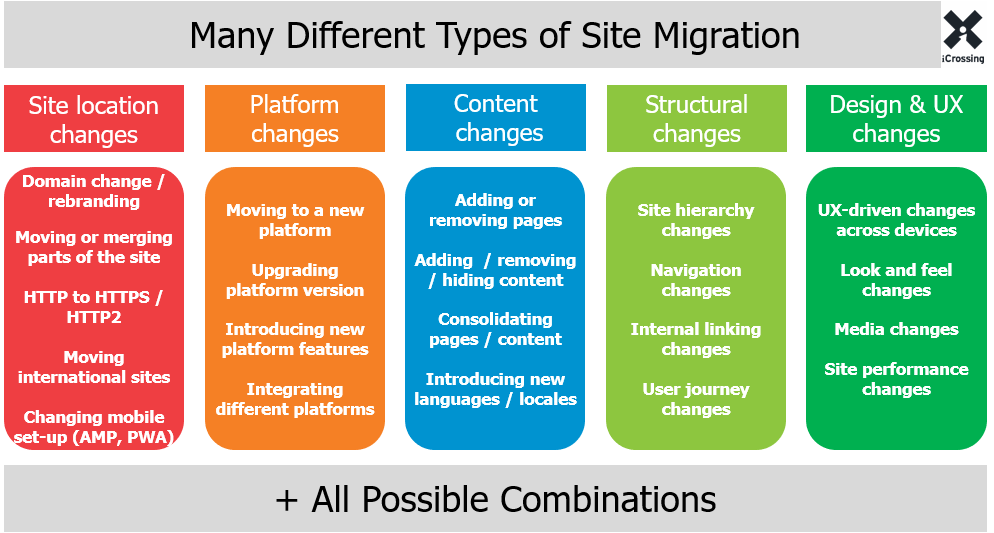
Also, think seriously about growth potential. A system that handles your current traffic might completely fall apart once you rank better and attract more visitors. Since migrating platforms later is expensive and risky for rankings, it’s better to pick a solution that scales with you from the start.
Technical due diligence: Before you build
Choosing a platform is only one step—you also need to verify its performance and prepare for the transition. Follow these steps to ensure your site stays fast and your rankings remain stable.
Test performance
Marketing claims rarely tell the full story regarding speed and performance. Be sure to test actual sites built on each platform with PageSpeed Insights and check both mobile and desktop scores since mobile usually reveals problems desktop hides.
To see how these platforms actually perform:
- Test more than once: Run tests after adding plugins, apps, or new features. One bad app can quietly tank performance, like a pop-up tool that blocks rendering and crushes your traffic.
- Test from different locations: A site that loads fast in the US might crawl overseas. If you have an international audience, verify how the platform handles global CDNs.
- Test actual pages: Homepages often look great in benchmarks, but blog posts, product pages, and category pages tell the real story. Move your focus to the pages that tend to carry the ranking weight.
- Consider real-world examples: Look at sites from actual businesses, not just showcase sites in marketing materials. Real sites built by regular people show what you’ll actually get.
Manage migration risks
Since URL changes hurt temporarily (even with perfect 301 redirects in place), switching platforms mid-project is genuinely risky for rankings.
To minimize the damage:
- Plan every redirect carefully: Map all your old URLs to their new counterparts. Track your rankings and organic traffic super closely for several weeks after you go live.
- Audit your meta data: Make absolutely sure your meta descriptions and title tags transfer correctly. I’ve seen businesses lose months of optimization work because they missed a step and didn’t notice until rankings tanked.
- Fix internal links in bulk: Crawl the staging site before launching and crawl the live site again immediately after to prevent ranking decay. Posts that point to outdated URLs quietly drain authority across your site.
- Expect short-term volatility: Give search engines time to reprocess and monitor trends rather than daily swings. Even perfect migrations cause ranking wobble, and panic reactions make it worse.
Source
Don’t forget about platform lock-in
Consider how easily you can leave a platform before you commit. Some proprietary builders make exporting content nearly impossible, which effectively holds your SEO data hostage. If you decide to move later, you may have to manually copy and paste every page—a process that practically guarantees broken links and lost rankings.
Open-source platforms offer more freedom, but they don’t solve everything. You own the data, but your design and custom features won’t just transfer to a new system. Check the export options up front so you don’t get trapped in a platform that eventually stops serving your goals.
Foundation vs. strategy
Platforms definitely matter, but they don’t account for every aspect of SEO success. I’ve personally seen supposedly terrible platforms rank with great content and strong backlink profiles. I’ve also seen technically perfect platforms fail miserably with poor content that nobody wants to read or link to.
Since SEO fundamentals remain the same on every platform, driving real results means maintaining content quality, publishing consistently, building real links, and improving actual user experience. Yes, the platform establishes a technical foundation, but it’s your actual work and content strategy that determine whether you succeed or fail.
Remember, too, that search algorithms are always changing—often dramatically. Your platform must adapt through regular updates or offer a flexible enough architecture to accommodate whatever new requirements Google throws at everyone. Active development communities and platforms that release regular updates put you in a much better position for whatever comes next.
Conclusion
While the platform you choose provides an engine, you still need a roadmap to reach your goals. Whether you’re launching a new site or optimizing an existing one, the right strategy and resources make all the difference.
Interested in expert guidance for your SEO journey? Our team can help you with platform selection, content strategy, and technical optimization to drive real organic growth.
Book a call to discuss your project, or download our free SEO resources to get started today.
Want more insights like this? Subscribe to our Field Notes.